🛠️ How to Use It
Create a print-ready passport or visa photo in four quick steps — no design skills needed.
- Upload your photoClick the upload box or drag and drop a clear, front-facing JPG, PNG, or WEBP image. It loads instantly and privately in your browser.
- Choose your sizePick your country or document from the size list (US, India, UK/EU, UAE, Saudi Arabia, and more), or set a custom size in millimetres, and select the print DPI.
- Adjust the cropUse the zoom slider and drag the photo to position the face correctly. Turn on the alignment guides to line up the head and eyes, and pick a background fill if needed.
- Download or print a sheetSave a single print-ready photo, or switch to “Print sheet” to tile multiple copies on 4×6, A4, or Letter paper with cut lines — then download or print.
🏠 How to Take a Passport Photo at Home (Step-by-Step Guide)
No studio needed — follow these four steps to capture a photo you can turn into a compliant passport picture in minutes.
Find soft, even light
Face a window during the day so light falls evenly on your face from the front. Avoid overhead lights, lamps, or flash — they cast shadows under the eyes and nose that can get your photo rejected.
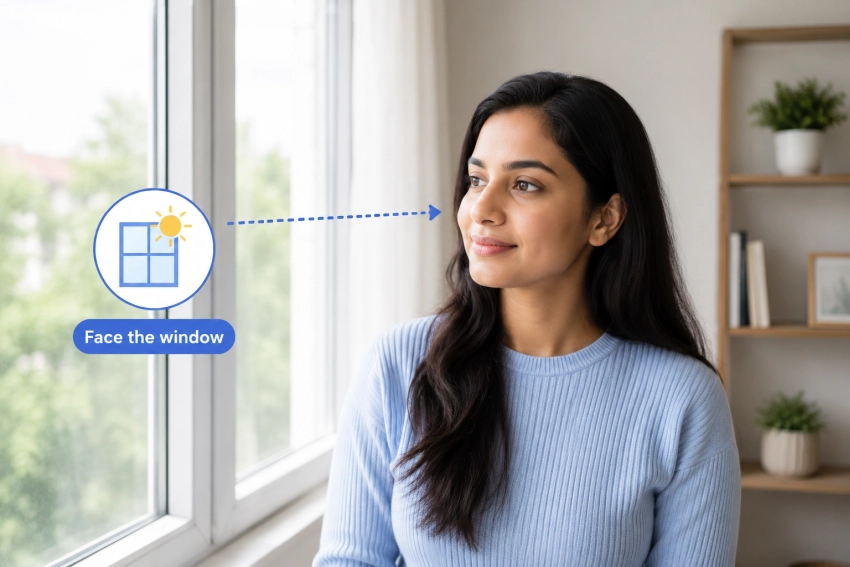 Face the window
- Shadows across the face
- Light from above or the side
- Flash glare or backlighting
Set up the shot
Prop your phone at eye level, about 4–6 feet away, and use the timer or a second person instead of a selfie arm — a straight-on shot avoids the distortion that close-up selfies create.
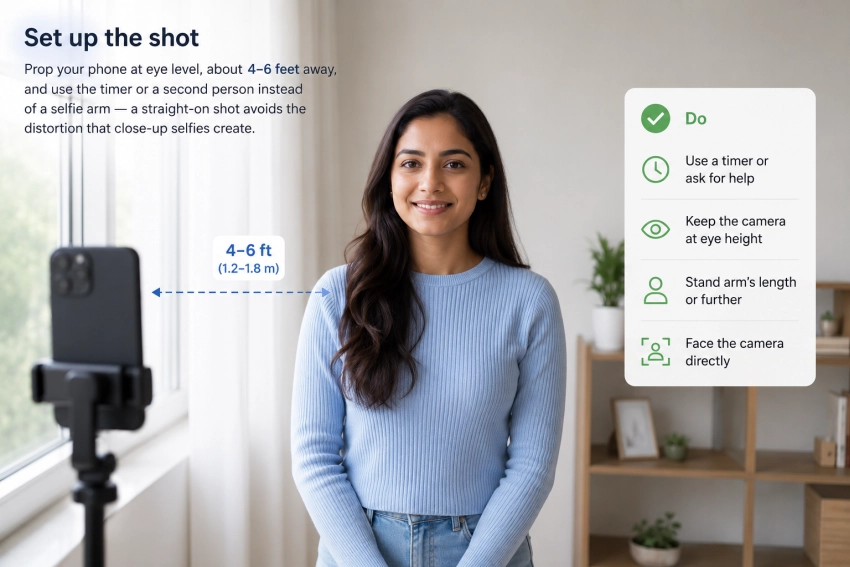 4–6 ft • eye level
- Use a timer or ask for help
- Keep the camera at eye height
- Stand arm's length or further
Pose against a plain wall
Stand a couple of feet in front of a plain white or light-coloured wall, look straight ahead with a neutral expression, and remove glasses, hats, or headphones (religious head coverings are usually fine).
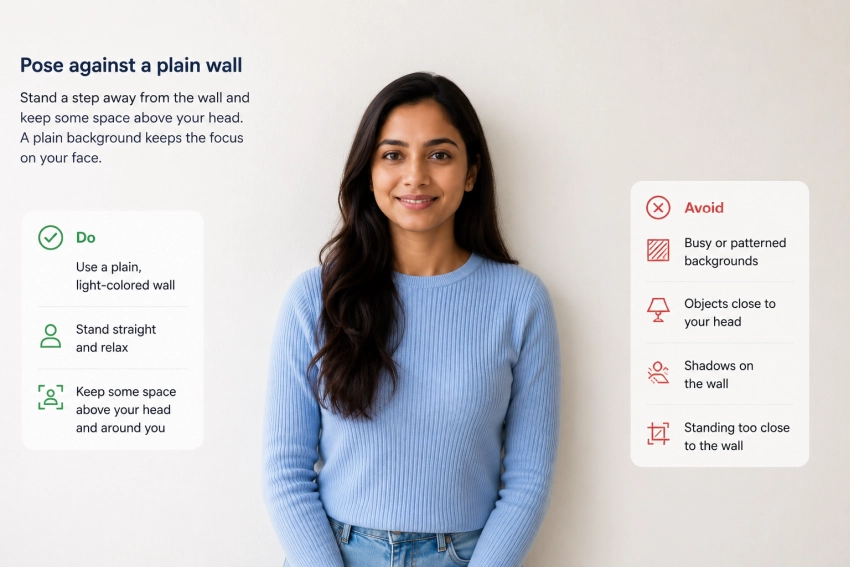 Plain background
- Patterned or busy backgrounds
- Glasses, hats, or headphones
- Smiling or tilted head
Upload, crop, and download
Upload the photo above, pick your country's size from the list, and use the alignment guides to centre your head and eyes. The tool crops it to the exact millimetre spec — no rules to measure yourself.
- Check size matches your document
- Use the face alignment guides
- Preview before you download
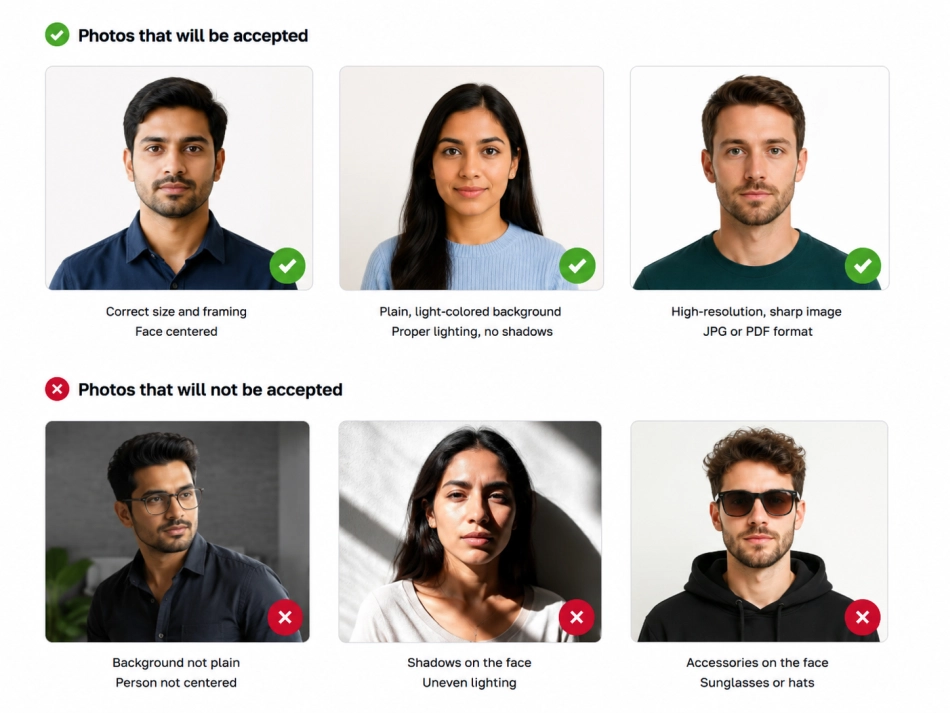
🖼️ Examples of Acceptable and Unacceptable Passport Photos
A quick side-by-side of what passes and what gets rejected. Acceptable photos have even lighting, a plain background, and a neutral, forward-facing expression. Unacceptable photos show shadows, tilted heads, busy backgrounds, or accessories like glasses and hats.
📷 About Passport Photo Maker
A free online tool that turns any photo into a correctly sized passport or visa photograph — right in your browser.
Passport and visa photos must meet strict size and layout rules that differ from country to country. Getting the dimensions, head position, and background right by hand is tricky, and studio prints can be slow and costly. Our Passport Photo Maker does it for you: choose your country's official size and the tool crops your photo to the exact millimetre dimensions and correct pixel resolution for printing.
You can fine-tune the crop with zoom and drag, use built-in alignment guides to position the face, add a plain background, and export a single photo or a full print sheet ready for home or lab printing. Everything runs locally on your device — your photo is never uploaded to any server, so it stays completely private.
📌 Uses
A passport-sized photo is needed for many official and everyday purposes, including:
New passports and renewals that require photos in your country's exact specification.
Tourist, student, work, and Schengen visas — each with its own size and background rules.
National ID cards, driving licences, voter cards, and other official identity documents.
Competitive exam forms, college enrolment, and hostel or scholarship applications.
Employment forms, ID badges, and new-hire documentation.
Print a full sheet of copies at home or take the file to a photo lab or print shop.
❔ Frequently Asked Questions
Is this passport photo maker free?
Yes. It is completely free with no sign-up, no watermark, and no limit on how many photos you can create and download.
Are my photos uploaded to a server?
No. All cropping and processing happens locally in your web browser. Your photo never leaves your device and is not stored or shared.
Which country sizes are supported?
You can choose from presets including the US (2×2 in), India, UK/EU/Schengen, France, Germany, UAE, Saudi Arabia, Canada, Australia, China, Japan, Singapore, Pakistan, and more — or enter a custom size in millimetres.
What is the “Print sheet” option?
It tiles several copies of your photo onto a standard paper size (4×6 inch, A4, or US Letter) with cut lines, so you can print many photos at once at home or a lab and cut them out.
Can it remove or change my photo's background?
You can add a plain background fill (white, light blue, or grey), which is helpful for transparent images or when zooming out. For a busy background, it's best to take the photo against a plain wall as passport rules usually require.
What size and DPI should I use for printing?
Select your document's official size, then choose 300 DPI for standard prints or 600 DPI for higher quality. The tool automatically outputs the correct pixel dimensions for that physical size.
Do I need to check the rules myself?
Yes. This tool sets the correct dimensions, but authorities also have rules on expression, head coverage, lighting, and background. Always review your specific passport or visa office's photo guidelines before submitting.